Traditional CMS vs Static Sites: Why I Build Hybrid WordPress
Almost every project I start begins with the same question: “Should we build it on WordPress, go with Webflow, or just make a static site?” Each answer sounds reasonable. Each one also comes with a catch that usually shows up six months after launch, when the invoice for the plan upgrade arrives, the site gets hacked, or the marketing team realises they can’t change a headline without opening a ticket.
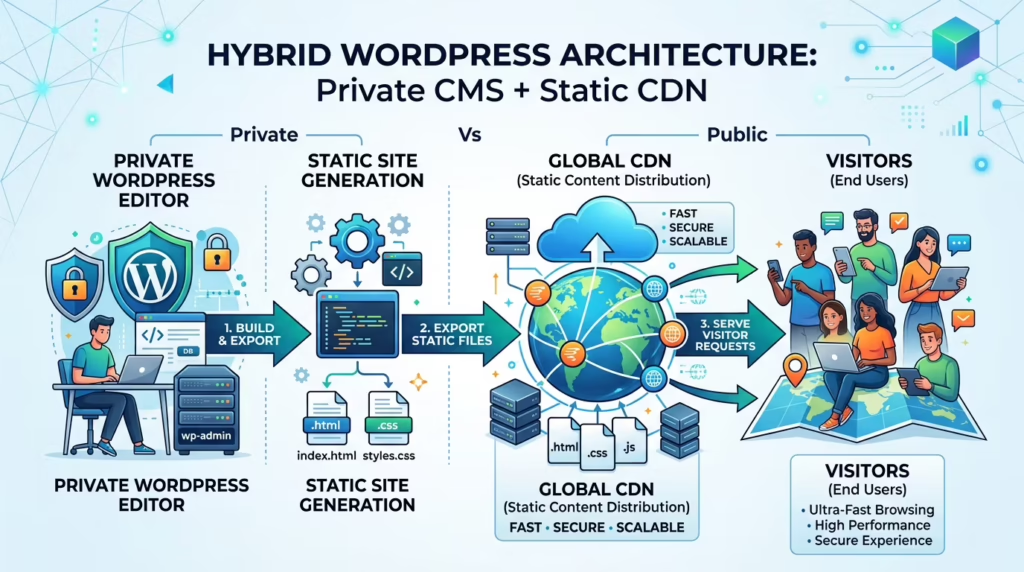
After years of building on all three, I stopped picking one of them. For most business websites I now build a hybrid: WordPress stays as the editor, hidden away from the public internet, and visitors get a fast, flat, static copy of the site served from a CDN. This post explains why, where the approach breaks down, and how to tell whether it fits your site.
The short version: a hybrid WordPress site gives your team the editor they already know and gives visitors a static site that has no login page, no database and no PHP to attack. You trade away some dynamic features, and most of them can be added back with small services.
The three options everyone is choosing between
When people compare website platforms, they are usually weighing three very different ideas of what a website is. None of them is bad. Each one is optimised for someone, and that someone is not always you.
1. SaaS builders: Webflow, Shopify, Wix
These are the easiest way to get something good-looking online. Hosting, security patches and backups are someone else’s job, and the visual editors are excellent. I build on Webflow myself, and for some teams it is the right call.
The catch is that you are renting, not owning. Your price is tied to plan tiers, CMS item limits and seat counts that the vendor can change. Your content lives in their database, and exporting it is rarely a clean exit: you typically get the front end, not a working site you can move to another host and keep editing. None of this matters on day one. It matters a lot in year three.
2. Pure static sites: JAMstack, hand-coded, AI-generated
A static site is just HTML, CSS and JavaScript files. There is no server-side code to exploit, pages load almost instantly from a CDN, and hosting often costs nothing. From a technical point of view it is close to perfect, which is why developers love it.
The problem is everyone who isn’t a developer. Changing a price, adding a blog post or swapping a photo means editing Markdown files, pushing to Git or asking the person who built the site. The new wave of AI-generated sites makes this worse, not better: generating the first version takes minutes, but every later change still happens in code, often code nobody on the team fully understands. The site is fast, and the business is stuck waiting for a developer.
3. Classic WordPress
WordPress is the default for a reason. According to W3Techs, it runs about 40% of all websites and close to 59% of the sites that use a known CMS. Editors know it, the ecosystem is enormous, and you own everything: code, content and data.
The price of that popularity is that it is the internet’s favourite target. In a classic setup, every visitor talks to the same PHP application, the same database and the same plugins your team uses to log in. Patchstack’s State of WordPress Security in 2026 report counted 11,334 new vulnerabilities in the WordPress ecosystem in 2025, 42% more than the year before. The key detail is where they come from:
- 91% were in plugins and 9% in themes. WordPress core had only six, all low priority.
- 46% had no fix available when they were publicly disclosed.
- For the most heavily exploited vulnerabilities, the median time to mass exploitation was about five hours.
Read that last point again. Nobody updates plugins within five hours, every time, forever. So the real question is not “how do we patch faster?” It is “why is the part of the site that has these vulnerabilities reachable by strangers at all?”
Side by side
| SaaS builder | Pure static | Classic WordPress | Hybrid WordPress | |
|---|---|---|---|---|
| Who edits content | Your team, in the vendor’s editor | A developer, in code | Your team, in WordPress | Your team, in WordPress |
| What the public can reach | Vendor’s platform | Static files only | PHP, database, plugins, login | Static files only |
| Speed | Good | Excellent | Depends on hosting and plugins | Excellent |
| Hosting cost | Monthly plan per site | Often free | Managed hosting | Often free for the public site |
| Who owns it | You rent it | You own it | You own it | You own it |
| Dynamic features | Built in, within limits | Added with services | Plugins | Added with services |
How a hybrid WordPress site works
The idea is simple: separate the place where content is made from the place where it is served.
  Your team                               Your visitors
      │                                         ▲
      ▼                                         │
┌─────────────────┐   export   ┌─────────────────────────┐
│ Private         │ ─────────▶ │ Static HTML, CSS, JS    │
│ WordPress       │            │ on a global CDN         │
│ (not public)    │            │ (Cloudflare Pages etc.) │
└─────────────────┘            └─────────────────────────┘
- WordPress lives somewhere private. A password-protected subdomain, a server behind an IP allowlist or even a local machine. Editors log in and work exactly as they do today, with the same blocks, media library and plugins.
- A generator turns it into flat files. A tool such as Simply Static crawls the site and saves every page as plain HTML with its CSS, JavaScript and images.
- The files go to a CDN. The export is deployed to a static host such as Cloudflare Pages, Netlify or Vercel, directly or through a Git repository. That is the only thing the public ever sees.
When an editor clicks “Publish”, the site is regenerated and redeployed. For a typical marketing site that takes seconds to a few minutes.
Why it is faster, safer and cheaper
Security: there is nothing left to log in to
On the public site there is no /wp-login.php, no xmlrpc.php, no database and no PHP running. A vulnerable contact-form plugin can still exist inside your private WordPress, but an attacker can’t reach it, because its code never ships to the public server. You still update plugins, but a missed update stops being an emergency.
Speed: pages are ready before anyone asks for them
A classic WordPress page is built on every request: PHP runs, the database is queried, plugins hook in, and only then does HTML go out. A static page is already built and sits on a CDN close to the visitor. That makes Google’s Core Web Vitals targets (LCP under 2.5 s, INP under 200 ms, CLS under 0.1) much easier to hit and keep.
Speed is not a vanity metric. Google has shared that in retail, a one-second delay in mobile load times can hurt conversion rates by up to 20%. If you want the details on how I measure and fix this, see my Core Web Vitals optimization service.
Independence: your team edits, no developer needed
This is the part pure static sites get wrong. In a hybrid, the marketing team keeps the WordPress editor they already know. New landing page, new blog post, new team photo: they do it themselves and publish. I get called when there is something to build, not to change a comma.
Cost: hosting the public site is often free
Static hosting is cheap because serving files is cheap. The Cloudflare Pages free plan includes unlimited static requests and bandwidth and 500 builds a month, which covers most business sites comfortably. The private WordPress still needs a home, but it serves a handful of editors instead of every visitor, so it can run on a small, inexpensive server.
The honest part: what you give up
A static site can’t run code on the server, so anything that needs a server has to come from somewhere else. This is where most “static is always better” articles go quiet. Here is what actually changes:
- Forms. A WordPress form plugin can’t submit to a static site. I send forms to a small endpoint instead, usually an n8n workflow that emails the team, saves the lead to a CRM and replies to the visitor.
- Search. WordPress search needs a database. On a static site, a client-side index (for example Fuse.js) or a hosted service like Algolia does the job, and is usually faster.
- Comments. Native comments are out. Most business blogs don’t need them; if yours does, an external comment service works.
- Publishing delay. Changes go live after the rebuild, not instantly. Seconds to minutes is fine for a marketing site. It is not fine for live scores.
- Logged-in features. Shops with carts, membership areas, customer dashboards and anything personalised per user need a real server. Those are not hybrid projects.
Some export tools cover part of this for you. The free version of Simply Static exports to a folder or ZIP; the paid Pro version adds direct deploys to GitHub, Cloudflare Pages, Netlify and others, plus built-in forms and search.
Hybrid vs headless WordPress
People often mix these up. Headless WordPress uses WordPress only as a content API and rebuilds the whole front end in a JavaScript framework such as Next.js. It is powerful, but you now maintain two applications, previews get complicated, and every new layout is a developer task again.
Hybrid WordPress keeps the normal WordPress theme and simply exports what it renders. Editors see exactly what visitors will see, page builders keep working, and there is one codebase instead of two. For content sites, that is usually the better trade.
Which one should you choose?
My rule of thumb
- Online store, membership site or web app? Use a platform built for it: Shopify, WooCommerce on managed hosting, or a custom app.
- Small site, one person editing, no budget for a developer? A SaaS builder like Webflow is a perfectly good choice.
- Developer-only project, content rarely changes? A pure static site is simplest.
- Business site, blog or marketing site that a team updates regularly? Hybrid WordPress. This is most of the sites I build.
Moving an existing WordPress site to hybrid
If you already run WordPress, you don’t need to start over. The content, design and URLs can all stay. A typical migration looks like this:
- Audit the plugins. List everything that needs a server at runtime: forms, search, comments, popups, bookings. Each one gets a static-friendly replacement or is dropped.
- Move WordPress out of public view. Put it on a private subdomain behind authentication, so only editors can reach it.
- Set up the export and deploy. Generate the static site and connect it to the host, ideally through Git so every release is versioned.
- Check SEO before switching DNS. Same URLs, canonical tags, sitemap, redirects and structured data. Crawl the static copy and compare it with the live site.
- Switch and measure. Point the domain to the CDN and compare Core Web Vitals before and after.
FAQ
Is a static WordPress site bad for SEO?
No. Search engines see normal HTML pages, and usually faster ones. SEO plugins like Yoast or Rank Math still work, because their titles, meta tags, sitemaps and schema are part of the exported HTML. You just have to make sure the export includes the sitemap and redirects.
Can I still use page builders and plugins?
Yes, as long as they produce their output when the page is rendered. Page builders, SEO plugins, galleries and sliders are fine. Plugins that need the server when a visitor clicks something, such as forms, search or carts, need a replacement.
Do I still need to update WordPress?
Yes, but with far less pressure. The private install should still be kept up to date. The difference is that a missed update no longer exposes your public website, because the public site doesn’t run WordPress at all.
How long does publishing take?
It depends on the size of the site and the export method. For a typical business site with a few dozen to a few hundred pages, changes are usually live within minutes.
The takeaway: you don’t have to choose between an editor your team can use and a website that is fast and hard to break. Keep WordPress for writing, serve static files to the world, and add dynamic features only where you actually need them.
Not sure whether your site is a good fit? Send me the URL and I’ll tell you honestly whether hybrid makes sense, or whether you are better off with something else. You can also see how I approach hybrid websites and what it costs on the pricing page.
Keep reading.
Three more, still opinions, still with numbers attached.

The AI Web Design Hype: Why Clean Code and Real UX Still Win
“I built an award-winning website in two hours with AI.” If you spend any time on YouTube or X, you have seen…
The Death of Media Queries? How clamp() and a Smart Root Scale Make Truly Fluid Websites
Open the stylesheet of a typical website and count the @media blocks. It is not unusual to find dozens: one set of font sizes…
The “Bloated Code” Syndrome: Why I Stopped Reaching for GSAP and Swiper
Open the source of an average corporate website and you will often find the same pair of guests: GSAP for animations and…