The “Bloated Code” Syndrome: Why I Stopped Reaching for GSAP and Swiper
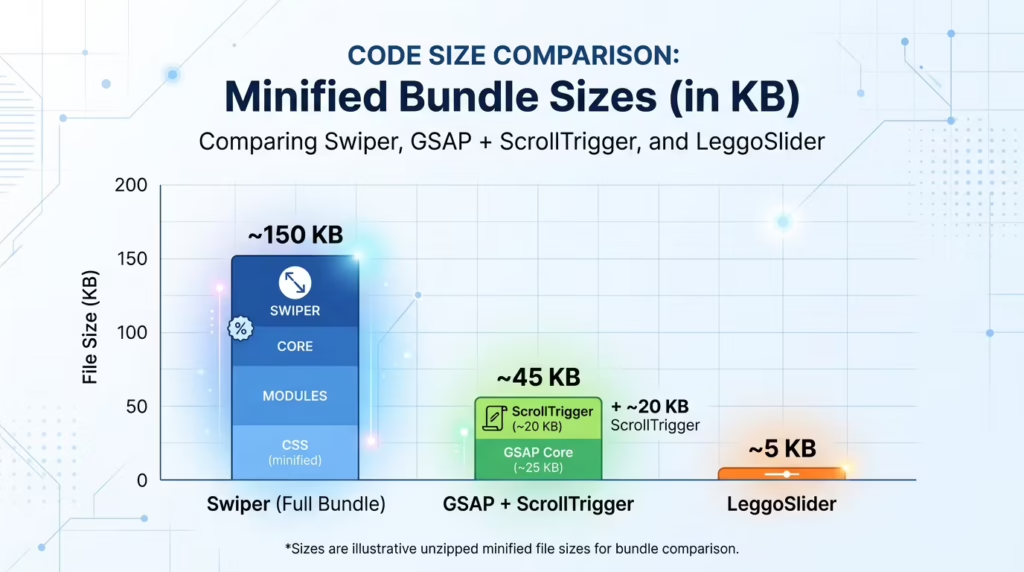
Open the source of an average corporate website and you will often find the same pair of guests: GSAP for animations and Swiper for a slider. And what do they actually do there? Fade a few headings in on scroll and rotate three client testimonials. It is like hiring a moving truck to carry a coffee cup across the street.
I used to do this too. Installing a library feels responsible: it is tested, documented and everybody uses it. But after years of performance audits I noticed that the scripts slowing sites down were rarely the complex ones. They were big, general-purpose libraries doing small, simple jobs. So for everyday interface work I switched to plain JavaScript and CSS. Here is why, with real numbers, and where I still happily use the big tools.
The short version: GSAP and Swiper are excellent libraries. The problem is using them for jobs that modern CSS and a few lines of vanilla JS handle on their own. Every kilobyte of JavaScript costs more than it looks, especially on mid-range phones, so ship only what the page actually needs.
First, this isn’t about GSAP or Swiper being bad
Let’s be fair. GSAP is one of the best animation engines ever written. If you are building an award-style promo site with long scroll-driven storytelling, SVG morphing or tightly choreographed timelines, it will save you weeks, and since 2025 it is completely free, plugins included. Swiper is a serious engine too: virtual slides for thousands of items, synced thumbnail galleries, dozens of transition effects.
The issue is proportion. Most business websites need a fade-in, a mobile menu, some tabs and one carousel. Using a full-scale engine for that means every visitor downloads and runs code for features the page never uses.
What the libraries actually weigh
You will often read that these libraries weigh “megabytes”. They don’t, and exaggerating doesn’t help the argument. I measured the current minified files straight from npm (GSAP 3.15, Swiper 14.3) next to my own tools:
| File | Minified | Gzipped |
|---|---|---|
| GSAP core | 73 KB | 28 KB |
| GSAP core + ScrollTrigger | 118 KB | 46 KB |
| Swiper bundle (JS) | 154 KB | 44 KB |
| Swiper core only (JS) | 67 KB | 20 KB |
| LeggoSlider (JS) | 11 KB | 4 KB |
| LeggoScroller (JS) | 8 KB | 3 KB |
So a typical “GSAP + ScrollTrigger + Swiper bundle” setup ships around 270 KB of minified JavaScript (roughly 90 KB over the wire) before the site’s own code even starts. My slider does the job a typical business site needs from Swiper in less than a tenth of the bundle’s size.
Why 100 KB of JavaScript isn’t the same as a 100 KB image
Download size is only the first bill. An image is decoded and painted. JavaScript has to be parsed, compiled and executed on the browser’s main thread, the same thread that responds to taps and clicks. On a fast laptop you won’t notice. On a mid-range Android phone, script work competes directly with the user trying to open your menu.
That shows up in Interaction to Next Paint (INP), the Core Web Vital that measures how quickly a page reacts to input. Google treats anything under 200 ms as good. Heavy scripts are one of the most common reasons sites miss it, which is why trimming JavaScript is usually the first thing I do in a Core Web Vitals audit.
My answer: a slider on a diet
After adding Swiper to one too many sites just to scroll through a few cards, I wrote my own. LeggoSlider is about 4 KB gzipped, has no dependencies, and covers what a business site actually uses:
- drag and swipe with snapping, arrows and dots;
- keyboard control (arrow keys, Home, End) and screen-reader announcements;
- respect for the “reduce motion” setting in the operating system;
- cards as wide as their content, no fixed slide widths to fight with.
There are no 3D cube effects or virtual slides, on purpose. The same thinking produced LeggoScroller, an infinite logo marquee in about 3 KB. Both are free, and you can try them on the tools page.
What “vanilla” looks like in practice
Most everyday effects need far less code than people expect. The classic “fade in when it scrolls into view”, the reason many sites load GSAP in the first place, is a few lines with IntersectionObserver:
const io = new IntersectionObserver((entries) => {
  entries.forEach((entry) => {
    if (!entry.isIntersecting) return;
    entry.target.classList.add('is-visible');
    io.unobserve(entry.target);
  });
}, { rootMargin: '0px 0px -10% 0px' });

document.querySelectorAll('.reveal').forEach((el) => io.observe(el));
.reveal { opacity: 0; translate: 0 1.5rem; transition: opacity .6s, translate .6s; }
.reveal.is-visible { opacity: 1; translate: 0 0; }
@media (prefers-reduced-motion: reduce) {
.reveal { opacity: 1; translate: none; transition: none; }
}One caveat: if JavaScript fails to load, those elements stay invisible. In production I add the hidden state only after the script has started (for example with a class on <html>), so content is always readable.
The browser also does a lot of this for free now:
-
Accordions and FAQs: the native
<details>and<summary>elements, accessible out of the box, zero JavaScript. -
Simple galleries: CSS
scroll-snapgives you a swipeable row with native momentum on phones. -
Modals: the
<dialog>element handles focus and the Escape key for you. -
Scroll-linked effects: CSS scroll-driven animations (
animation-timeline: view()) can run off the main thread and work in Chromium browsers and, since Safari 26, in Safari too. I use them as progressive enhancement, so browsers without support simply show the content without the effect.
The shared CDN cache is a myth now
The other habit I see everywhere is loading libraries from a public CDN like cdnjs or jsDelivr. The old argument went: “Lots of sites use the same file, so the visitor probably has it cached already.”
That stopped being true years ago. To block tracking and cross-site leaks, browsers now partition their cache by the site you are visiting. Safari did it first, Chrome followed in version 86 and Firefox did the same. A copy of GSAP cached on someone else’s site is not reused on yours. Your visitor downloads it again, and on top of that the browser has to open a connection to one more server: DNS lookup, TCP and TLS handshake.
There is a security side too. In 2024 the popular polyfill.io domain changed owners and started injecting malicious code into more than 100,000 websites that linked to it. Those sites didn’t change a single line of their own code.
My rule
If a project really needs a big library, I install it from npm and serve it from the site’s own domain, bundled with the rest of the code or at least self-hosted. One fewer connection, one fewer company that can break or hijack the site. If you must use a third-party CDN, pin the exact version and add a integrity hash (Subresource Integrity).
When I still reach for GSAP or Swiper
Vanilla JS is not a religion. I use the big tools when the project genuinely needs what they do best:
- GSAP: complex sequenced timelines, scroll storytelling with pinning and scrubbing, SVG morphing, anything where precise choreography matters more than a few kilobytes.
- Swiper: galleries with hundreds of slides (virtual slides), synced main and thumbnail carousels, or a client who really does want that 3D coverflow.
Even then I load them only on the pages that use them, not site-wide. A library that animates the homepage hero has no business loading on the contact page.
How to check your own site in five minutes
- Run your homepage through PageSpeed Insights and look for “Reduce unused JavaScript”.
- In Chrome DevTools, open the Coverage tab (Cmd/Ctrl+Shift+P, then type “coverage”) and reload. It shows how much of each script actually ran.
- In the Network tab, filter by JS and sort by size. For every large file, ask: which feature on this page needs it?
- Check which scripts load from other domains, and whether they could be served from your own.
FAQ
Is GSAP bad for performance?
No. GSAP itself is very fast at animating. The cost is the size of the library and loading it for effects that CSS could handle. On an animation-heavy site it is often the most efficient option.
What is the lightest alternative to Swiper?
For a simple row of cards, CSS scroll-snap with no JavaScript at all. If you need arrows, dots, drag on desktop and keyboard support, a small dedicated script like LeggoSlider (about 4 KB gzipped) covers it.
Does removing JavaScript improve SEO?
Indirectly. Core Web Vitals are part of how Google evaluates page experience, but content and relevance matter far more. The bigger win is for people: a page that responds instantly keeps visitors and converts better.
Should I load libraries from a CDN or my own server?
From your own domain in almost every case. Shared browser caching no longer works across sites, and self-hosting removes an extra connection and a third-party dependency.
The takeaway: check every script against the job it does. Use the platform first, a small focused script second, and a big library only when the project needs its power. Your visitors on slow phones will feel the difference even if they never know why.
Want to know what’s slowing your site down? Send me the URL and I’ll tell you which scripts are worth keeping. Or grab the free slider and scroller and see how far you get without the heavy libraries.
Keep reading.
Three more, still opinions, still with numbers attached.

The AI Web Design Hype: Why Clean Code and Real UX Still Win
“I built an award-winning website in two hours with AI.” If you spend any time on YouTube or X, you have seen…
The Death of Media Queries? How clamp() and a Smart Root Scale Make Truly Fluid Websites
Open the stylesheet of a typical website and count the @media blocks. It is not unusual to find dozens: one set of font sizes…
Traditional CMS vs Static Sites: Why I Build Hybrid WordPress
Almost every project I start begins with the same question: “Should we build it on WordPress, go with Webflow, or just make…